
Connect your Square account once and Tan-Link pulls in everything you sell in Square, from tops, dresses and outerwear to jewelry, shoes and gift ideas, with sizes, colors, prices, tax and stock. Your team keeps running the boutique in Square exactly as they do now. At the counter, Square items ring up in Tan-Link next to tans, packages and memberships, in one cart with one card payment.
Manage it in Square. Check out in Tan-Link. See all of your business in one place.
Tan-Link pulls your whole Square catalog automatically: every item, variation, SKU, price, tax rate and stock level. A top in S, M, L and XL arrives exactly as it is in Square.
Add a new arrival, mark down a top or restock in Square, and Tan-Link updates automatically, ready to check out.
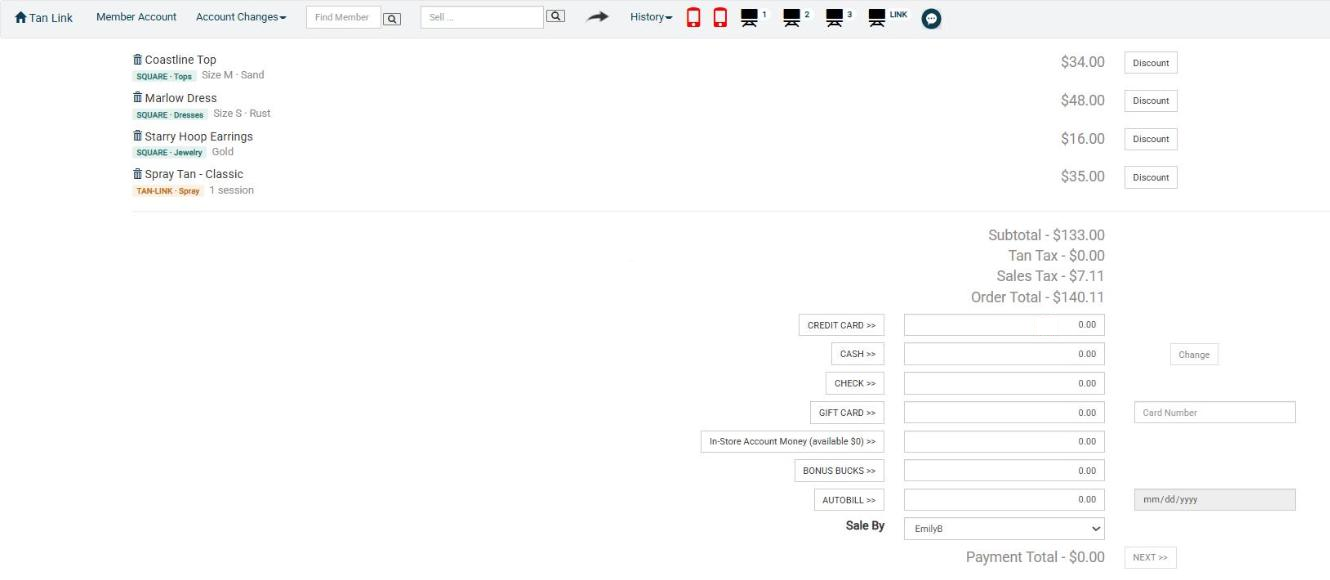
A boutique top, a spray tan and a monthly membership go in the same Tan-Link cart and are paid once, through Tan-Link payments.
Every Square item sold in Tan-Link is recorded back in Square, so stock counts go down and the Square reports you rely on stay complete.
Orders from your Square Online store stay paid through Square and are copied into Tan-Link as sales on the client's account.
Square items live in their own Square department and keep Square's categories. Any Tan-Link report runs on Square, Tan-Link or both.
Website orders are matched to the client's Tan-Link account by email, then by phone. New buyers are created with the details Square holds.
AI Deal Blaster and AI Business Analysis see boutique purchases too. "Text everyone who bought a dress over $40 in May a free spray tan before their next event."
Automatic, no buttons to press
How the two systems work together
Sign in to Square once from Tan-Link. Setup is done with you.
Tan-Link imports your catalog and stock, and keeps them current.
Search Square items into the Tan-Link cart with tans and packages.
One card payment in Tan-Link. Square stock and reports update on their own.
A sample boutique website run on Square, and the same items checked out in Tan-Link. Store, names and prices are examples.
Book a free, no-pressure demo and we'll show you how your Square items ring up at the Tan-Link counter, next to your tans and packages.
Schedule a free demoSample store and checkout shown for illustration. Square is a trademark of Block, Inc. Tan-Link is not affiliated with or endorsed by Block, Inc.